Freely Propagating 2D Premixed Flame
This tutorial introduces the simulation of a freely propagating two-dimensional premixed flame with DINO. By the ending of this tutorial the user gets familiar with the following steps:
- setting up a two-dimensional premixed combustion case
- defining the computational domain and boundary conditions
- specifying the hydrogen-air mixture and chemical reaction mechanism
- running DINO
- visualizing and analyzing the spatial flame structure
A freely propagating premixed flame is a flame in which fuel and oxidizer are mixed before combustion and the flame front propagates through the unburned mixture. Such configurations are commonly used to study fundamental flame behavior and the spatial variation of temperature and chemical species across the reaction zone.
In this tutorial, a stoichiometric hydrogen-air mixture is considered. Based on the reaction
the mixture composition is specified in DINO as
The mixture is initialized at a pressure of 101325 Pa and a temperature of 300 K. Chemical reactions are described using the h2_williams_12 reaction mechanism.
The computational domain has dimensions of 2 mm × 5 mm with 97 grid points in the x-direction and 128 grid points in the y-direction. Only one grid point is used in the z-direction, resulting in an effectively two-dimensional simulation.
A subsonic inlet is applied at the left boundary and a subsonic outlet at the right boundary. Periodic boundary conditions are applied in the remaining directions.
The following sections describe how the input file is created, how the simulation is executed with DINO, and how the resulting temperature and species fields can be post-processed.
Creating the run directory
Before creating the input file, we first need a folder where the simulation will be stored. It is useful to keep the simulation cases outside the DINO source directory. For example, you can collect your cases in a directory called dino_runs.
If you already have a dino_runs directory, simply go there:
If the directory does not exist yet, create it first and then enter it:
Now create a separate folder for our 2D premixed flame case:
Keeping each simulation in its own folder makes it easier to organize the input file, output data and post-processing scripts.
For Sofja users at OvGU
When working on the Sofja cluster, create the dino_runs directory in /scratch. If the directory already exists, you can simply enter it and create the new case folder there.
Creating your own DINO_IN file from scratch
Every simulation performed with DINO requires an input file named DINO_IN. This file contains the parameters needed to define and run the simulation. The parameters are organized into different Fortran namelist sections, with each section controlling a specific part of the setup such as the computational domain, boundary conditions, initialization, reactions, transport properties and output.
For this tutorial, we will create the DINO_IN file step by step so that the purpose of the most important parameters becomes clear.
First, create a new file inside the freely_propagating_2D_premixed_flame directory using the text editor of your choice. Here, we use Vim:
Hint
A complete overview of the available namelist sections and their parameters can be found in the main input file documentation.
Defining the computational domain
We start by defining the size and resolution of the computational domain. For this purpose, DINO uses the NML_DIMENSIONS namelist.
For the present flame simulation, use:
&NML_DIMENSIONS
    LENGTH_X=2.D-3,
    LENGTH_Y=5.D-3,
    LENGTH_Z=8.5D-3,
    DIMX_TOTAL=97,
    DIMY_TOTAL=128,
    DIMZ_TOTAL=1,
/
LENGTH_X, LENGTH_Y, and LENGTH_Z define the physical dimensions of the computational domain. The corresponding number of grid points is specified by DIMX_TOTAL, DIMY_TOTAL, and DIMZ_TOTAL.
The number of grid points in the Cartesian grid is controlled by DIMX_TOTAL, DIMY_TOTAL, and DIMZ_TOTAL. In this case, 97 grid points are used in the x-direction and 128 grid points in the y-direction. Since only one grid point is used in the z-direction, the computational setup is effectively two-dimensional.
Important
DIMZ_TOTAL=1 is essential for this tutorial because it reduces the computational setup to a 2D problem. Do not change the domain dimensions or grid resolution when reproducing this tutorial, since they are part of the validated setup.
Make sure that the variables inside a namelist are separated correctly and that every namelist is closed with /.
Next, the grid generation must be defined. For this purpose, create the GRIDDING namelist and define an equidistant Cartesian grid in all directions:
For the computational domain, we also need to define the boundary conditions. In this case, a subsonic inlet is used at the left boundary and a subsonic outlet at the right boundary. The remaining boundaries are periodic.
&NML_BOUNDARY
    BC_LEFT=1,
    BC_RIGHT=2,
    BC_UP=3,
    BC_DOWN=3,
    BC_FRONT=3,
    BC_BACK=3,
    P_INFTY=101325.D0,
/
The boundary conditions are selected using integer values. Here, 1 represents the subsonic inlet, 2 the subsonic outlet and 3 a periodic boundary condition.
Hint
Other boundary conditions can be selected using different integer values. The corresponding values are described in the boundary-condition documentation.
The time step determines how far the simulation moves forward in time during each calculation step. A small time step is used at the beginning of the simulation and DINO automatically adjusts it while the calculation is running. The minimum and maximum values limit how small or large the time step is allowed to become. TIME_END defines when the simulation should stop. WCT_LIM defines the wall clock time limit as in classical slurm jobs and should be set a little earlier than the slurm job time limit, as a last solution for restarting will be written.
&NML_CONTROL
    INIT_TIMESTEP=1.0D-8,
    TSTEP_MIN=1.0D-10,
    TSTEP_MAX=1.D-7,
    TIME_END=2.D-4,
    WCT_LIM="01:00:00",
    ITE_END=5000000,
    CFL_LIM=0.35D0,
    CFL_CTRL=.true.,
    FOU_LIM=0.15D0,
    FOU_CTRL=.true.,
/

&NML_TIME_INTEGRATION
    INTEGRATION_SCHEME=1,
/
CFL_CTRL and FOU_CTRL are used to control the time step during the simulation. The time-integration method is selected with INTEGRATION_SCHEME.
Hint
Different time-integration schemes can be selected using different integer values for INTEGRATION_SCHEME. See the time-integration documentation.
Now the domain, boundary conditions and time-step control are defined. What is still missing is the initialization of the premixed flame.
For this tutorial, the initial pressure is 101325 Pa and the base temperature is 300 K. The predefined h2_williams_12 mechanism is used for hydrogen-air combustion. The gas composition is specified as H2:1.0, O2:0.5, N2:1.88, corresponding to the stoichiometric mixture introduced at the beginning of this tutorial.
Create the INITIALIZE namelist as follows:
&NML_INITIALIZE
    INIT_TYPE=3,
    USE_COMPACT=.FALSE.,
    USE_EXPLICIT_FILTER=.false.,
    EXPLICIT_FILTER_ORDER=8,
    REDUCE_FD_ORDER=.false.,
    INIT_PRESSURE=101325.D0,
    INIT_TEMPERATURE=300.D0,
    SOLID_TEMPERATURE=300.D0,
    INIT_TEMP_OXID=300,
    INIT_TEMP_FUEL=300,
    RANDOMSEEDS=.true.,
    jet_flow_dir=1,
    INIT_XVEL=0.D0,
    INIT_YVEL=0.D0,
    INIT_ZVEL=0.D0,
    INIT_VEL_JET=0.0D0,
    INIT_VEL_PILOT=0.D0,
    INIT_VEL_COFLOW=0.0D0,
    INFLOW_BC=.false.,
    RADIUS=2.D-03,
    RADIUS_JET=0.15D-3,
    RADIUS_PILOT_IN=0.0D-3,
    RADIUS_PILOT_OUT=0.D-3,
    RADIUS_COFLOW=0.6D-3,
    STIFF=2.D4,
    INIT_TEMP_JUMP=0.D3,
    INIT_VEL_JUMP=0.D0,
    CONST_RHO=8.1889D-2,
    CONST_MU=9.000D-6
    GAS_PHASE(1)='h2_williams_12',
    GAS_PHASE(2)='H2:1.0, O2:0.5, N2:1.88',
    GAS_PHASE(3)='',
    EQUI_RATIO=0.0,
    SPECIES_FUEL(1)='H2',
    SPECIES_FUEL(2)='H2',
    SPECIES_PROD(1)='H2O',
    SPECIES_PROD(2)='H2O',
    SPECIES_INERT(1)='N2'
/
INIT_TYPE=3 is used to generate the initial flame configuration. The reaction mechanism is selected with GAS_PHASE(1), while GAS_PHASE(2) specifies the initial gas composition.
Important
Keep the complete INITIALIZE namelist shown above for this tutorial. The initialization creates the spatial flame structure required for this case.
For activating the chemical reactions, create the REACTION namelist:
&NML_REACTION
    REACTIVE=.true.,
    REACTION_START_IT=0,
    PHYSCHEM_LIB=1,
    FORCING=.true.,
    Y_FORCING_TYPE=0,
    ADD_SPARK=.false.,
/
REACTIVE=.true. activates chemical reactions and REACTION_START_IT=0 starts them from the beginning of the simulation. PHYSCHEM_LIB=1 selects Cantera for the physico-chemical calculations. No additional spark is used in this case to ignite the mixture, as a reactive initial solution is applied.
For molecular transport, use the following settings:
&NML_TRANSPORT
    MOLTRANS_LIB=1,
    DIF_SORET=.FALSE.,
    DIF_DUFOUR=.FALSE.,
    DIF_MULTI=.false.,
    DIF_ULEWIS=.false.,
    VOL_VISC=.FALSE.,
    EGLIB_MODEL_NUM=6,
    EGLIB_SCALE_FACTOR=1.D0,
/
For this tutorial, Soret, Dufour and multicomponent diffusion are disabled. When these diffusion models are disabled, DINO automatically uses the mixture-averaged diffusion model.
The remaining namelists required for this simulation are defined as follows:
&NML_DECOMPOSITION
/

&NML_SCALARS
    NSCAL=0,
/

&NML_IMMERSED_BOUNDARY
    IB_NUMBER=1,
/

&NML_POISSON_SOLVER
    PRESSURE_SPECTRAL_SOLVER=.true.,
    INCOMPRESSIBLE=.false.,
/

&NML_RESTART
    RESTART=.false.,
/

&NML_RADIATION
    RADIATION=.false.,
/

&NML_GRAVITY
    GRAVITY_X=0.D0,
    GRAVITY_Y=0.D0,
    GRAVITY_Z=0.D0,
/

&NML_PARAMETERS
    CLOSED_DOMAIN=.FALSE.,
/

&NML_VORTEX
    VORT_NUMB=0,
/

&NML_TWOPHASE
    NSEEDS=0,
/

&NML_TURBULENCE
    INIT_TURBU=.false.,
    TURBU_FORCING=.FALSE.,
/

&NML_VALIDATION_ERROR
    VALIDATION_ERROR=.false.,
/

&NML_NANOPARTICLES
    PBE_SOLVER=.false.,
/

&NML_POD
    POD=.FALSE.,
/
Most of these sections describe models that are not active in the present tutorial. For example, turbulence, gravity, radiation and the discrete second phase are disabled.
Now the DINO_IN file contains the information required to run the simulation. Before running the case, we still need to define which results should be written to the output files. For this purpose, create the SAVING namelist:
&NML_SAVING
    SAVING_TYPE=1,
    SAVING_RESTART_INTERVAL=5000,
    SAVING_AVERAGE_INTERVAL=10000,
    SAVING_CTRL_MAX_MIN_INTERVAL=50,
    SAVING_HDF5_FULL=.true.,
    SAVING_CTRL_HDF5_INTERVAL=500,
    SAVING_HDF5_START=0,
    SAVING_MPIIO=.true.,
    SAVING_MACH_NUMBER=.true.,
    SAVE_HEAT_RELEASE=.true.,
/
SAVING_TYPE=1 means that the output is controlled by iteration steps. Restart files are written every 5000 iterations, while full HDF5 result files are written every 500 iterations starting from iteration zero.
The HDF5 files contain the spatial simulation results and will later be used for post-processing. The Mach number and heat-release field are also included in the output.
Important for this tutorial
Keep the complete INITIALIZE settings when reproducing this case. The simulation starts from an initialized flame structure rather than a uniform cold mixture. The case is two-dimensional and laminar, with chemical reactions active from the beginning and no additional spark.
Running DINO
Now your simulation is ready to run. To launch the calculation, go to your project folder freely_propagating_2D_premixed_flame and run the executable file DINO_V<version>.e. The executable will use DINO_IN in the current directory as the default input file. If a different input file should be used, the path to that file can be given as the first command line argument to the DINO executable.
To run in parallel with MPI, type:
If the case is to be run on a supercomputer or cluster, a job command file can be created and used, depending on the server or machine where the simulation is performed. For more information about these scripts, you should contact your institute/company/HPC help desk.
For Sofja users at OvGU
You can use the following procedure to run the simulation with the Slurm job manager on Sofja.
Copy the following lines into your launch_script.sh:
#!/bin/bash
#SBATCH -J job
#SBATCH -o ./%x.%j.out
##SBATCH -e ./%x.%j.err
#SBATCH -N 1
#SBATCH --get-user-env
#SBATCH --ntasks-per-node 4
##SBATCH --ntasks=32
#SBATCH --cpus-per-task=4
##SBATCH --cpu-bind=threads
##SBATCH -d singleton
#SBATCH --time 00:30:00
#SBATCH --mem 257000
#SBATCH -p short

module purge
module load mpi/openmpi-4.1
source /beegfs1/software/DINO/env
mpirun -n $SLURM_NTASKS /beegfs1/software/DINO/dino/bin/dino_v10.0.0.e
Make sure that the path to the DINO executable is correct. Save launch_script.sh and run DINO with the following command:
Output and post-processing
After the simulation has finished, DINO creates several output directories in the simulation folder. The most important output directories are:
follow_on: contains information that can be used to continue the simulation.data_timevol: contains time-dependent output data.data_hdf5: contains the simulation results in HDF5 format. For this two-dimensional case, these files contain the spatial solution fields such as temperature, species mass fractions and heat release rate.data_restart: contains restart files that can be used to restart the simulation.
For the spatial post-processing in this tutorial, the HDF5 results stored in data_hdf5 are used.
The latest available HDF5 result of this simulation is
The following examples show how the spatial flame structure can be visualized using Python.
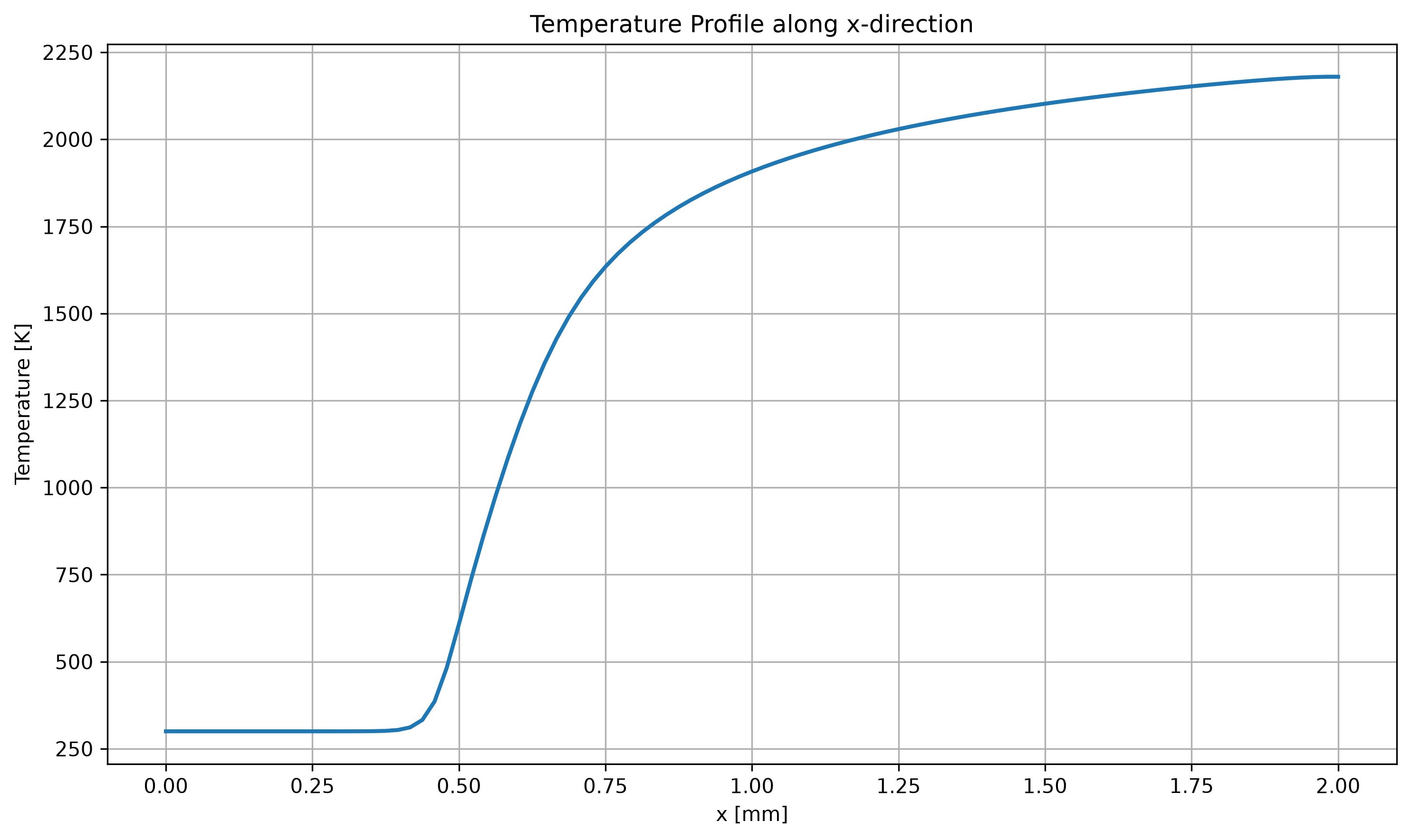
Temperature profile
The temperature field can be used to visualize the thermal structure of the flame. Here, the temperature is extracted along the x-direction at the middle of the computational domain.
import h5py
import numpy as np
import matplotlib.pyplot as plt


# ---------------------------------------------------------
# 1. Select the DINO HDF5 result file
# ---------------------------------------------------------
file_name = "data_hdf5/dino_res_12000.h5"


# ---------------------------------------------------------
# 2. Open the HDF5 file and read temperature
# ---------------------------------------------------------
with h5py.File(file_name, "r") as f:

    temperature = np.array(f["temper"])

    # Read grid information
    lower_bounds = f["CartGrid"].attrs["vsLowerBounds"]
    upper_bounds = f["CartGrid"].attrs["vsUpperBounds"]
    grid_points = f["CartGrid"].attrs["GridPoints"]


# ---------------------------------------------------------
# 3. Create the x-coordinate
# ---------------------------------------------------------
x = np.linspace(
    lower_bounds[0],
    upper_bounds[0],
    grid_points[0]
)

# Convert meters to millimeters
x_mm = x * 1000.0


# ---------------------------------------------------------
# 4. Select the middle line of the 2D domain
# ---------------------------------------------------------
# Temperature has shape (Ny, Nx).
# We select the middle y-position and plot along x.
middle_y = temperature.shape[0] // 2

temperature_profile = temperature[middle_y, :]


# ---------------------------------------------------------
# 5. Plot temperature along the x-direction
# ---------------------------------------------------------
plt.figure(figsize=(10, 6))

plt.plot(
    x_mm,
    temperature_profile,
    linewidth=2
)

plt.title("Temperature Profile along x-direction")
plt.xlabel("x [mm]")
plt.ylabel("Temperature [K]")

plt.grid(True)
plt.tight_layout()


# ---------------------------------------------------------
# 6. Save the figure
# ---------------------------------------------------------
plt.savefig(
    "temperature_spatial_profile.png",
    dpi=300,
    bbox_inches="tight"
)

plt.show()
The resulting temperature profile is shown below.
Species mass-fraction profiles
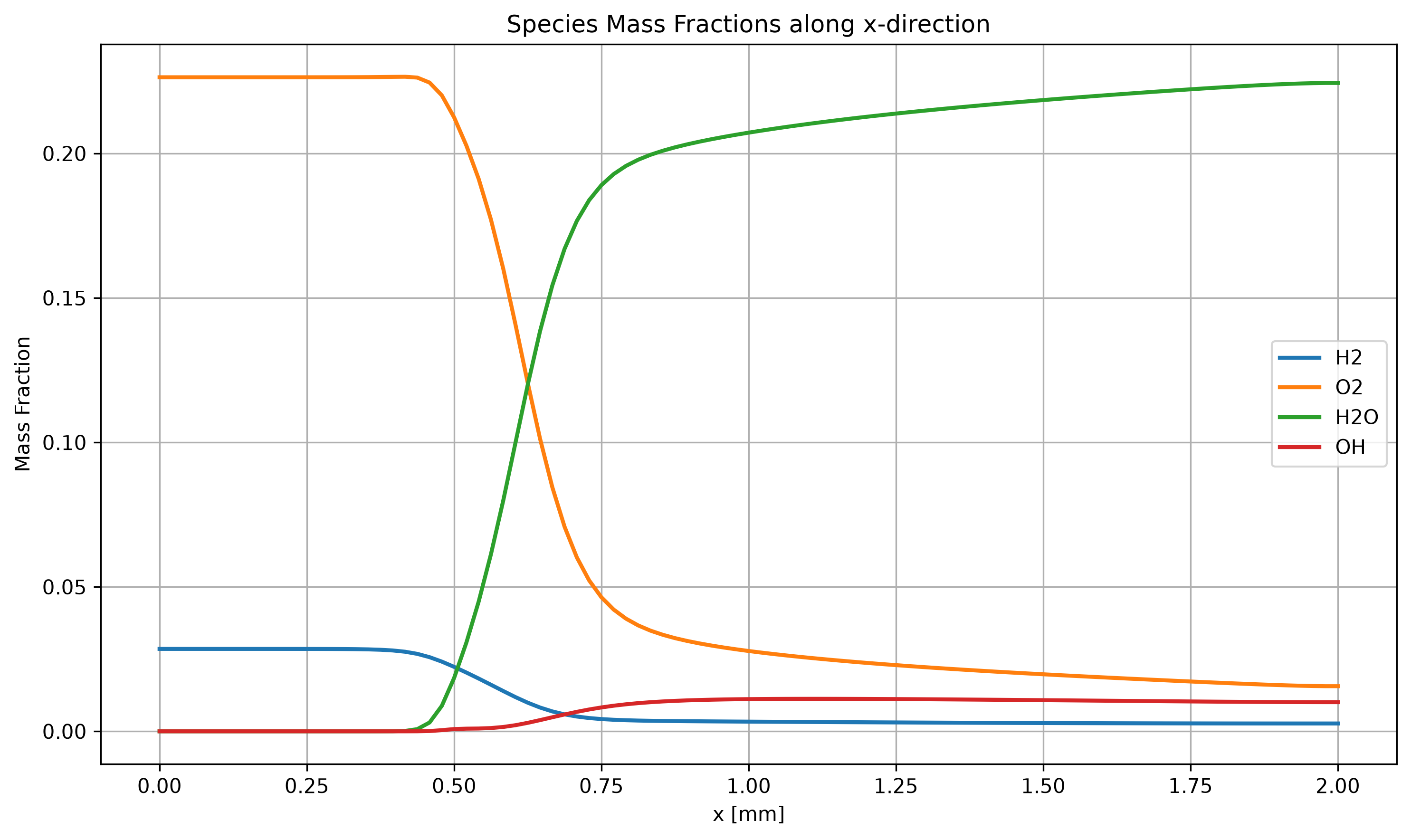
The spatial variation of the species mass fractions can be analyzed in the same way. Here, the mass fractions of H2, O2, H2O and OH are extracted along the x-direction at the middle of the computational domain.
import h5py
import numpy as np
import matplotlib.pyplot as plt


# ---------------------------------------------------------
# 1. Select the DINO HDF5 result file
# ---------------------------------------------------------
file_name = "data_hdf5/dino_res_12000.h5"


# ---------------------------------------------------------
# 2. Open the HDF5 file and read the species mass fractions
# ---------------------------------------------------------
with h5py.File(file_name, "r") as f:

    H2 = np.array(f["Y_H2"])
    O2 = np.array(f["Y_O2"])
    H2O = np.array(f["Y_H2O"])
    OH = np.array(f["Y_OH"])

    # Read grid information
    lower_bounds = f["CartGrid"].attrs["vsLowerBounds"]
    upper_bounds = f["CartGrid"].attrs["vsUpperBounds"]
    grid_points = f["CartGrid"].attrs["GridPoints"]


# ---------------------------------------------------------
# 3. Create the x-coordinate
# ---------------------------------------------------------
# DINO stores the grid coordinates in meters.
x = np.linspace(
    lower_bounds[0],
    upper_bounds[0],
    grid_points[0]
)

# Convert x from meters to millimeters
x_mm = x * 1000.0


# ---------------------------------------------------------
# 4. Select a line through the middle of the 2D domain
# ---------------------------------------------------------
# The arrays have shape (Ny, Nx).
# Therefore, the first index is y and the second index is x.
middle_y = H2.shape[0] // 2

H2_profile = H2[middle_y, :]
O2_profile = O2[middle_y, :]
H2O_profile = H2O[middle_y, :]
OH_profile = OH[middle_y, :]


# ---------------------------------------------------------
# 5. Plot the species profiles along the x-direction
# ---------------------------------------------------------
plt.figure(figsize=(10, 6))

plt.plot(x_mm, H2_profile, linewidth=2, label="H2")
plt.plot(x_mm, O2_profile, linewidth=2, label="O2")
plt.plot(x_mm, H2O_profile, linewidth=2, label="H2O")
plt.plot(x_mm, OH_profile, linewidth=2, label="OH")


# ---------------------------------------------------------
# 6. Add labels and finish the figure
# ---------------------------------------------------------
plt.title("Species Mass Fractions along x-direction")
plt.xlabel("x [mm]")
plt.ylabel("Mass Fraction")

plt.grid(True)
plt.legend()

plt.tight_layout()


# ---------------------------------------------------------
# 7. Save the figure
# ---------------------------------------------------------
plt.savefig(
    "species_spatial_profile.png",
    dpi=300,
    bbox_inches="tight"
)

plt.show()
The resulting species mass-fraction profiles are shown below.
Heat release rate profile
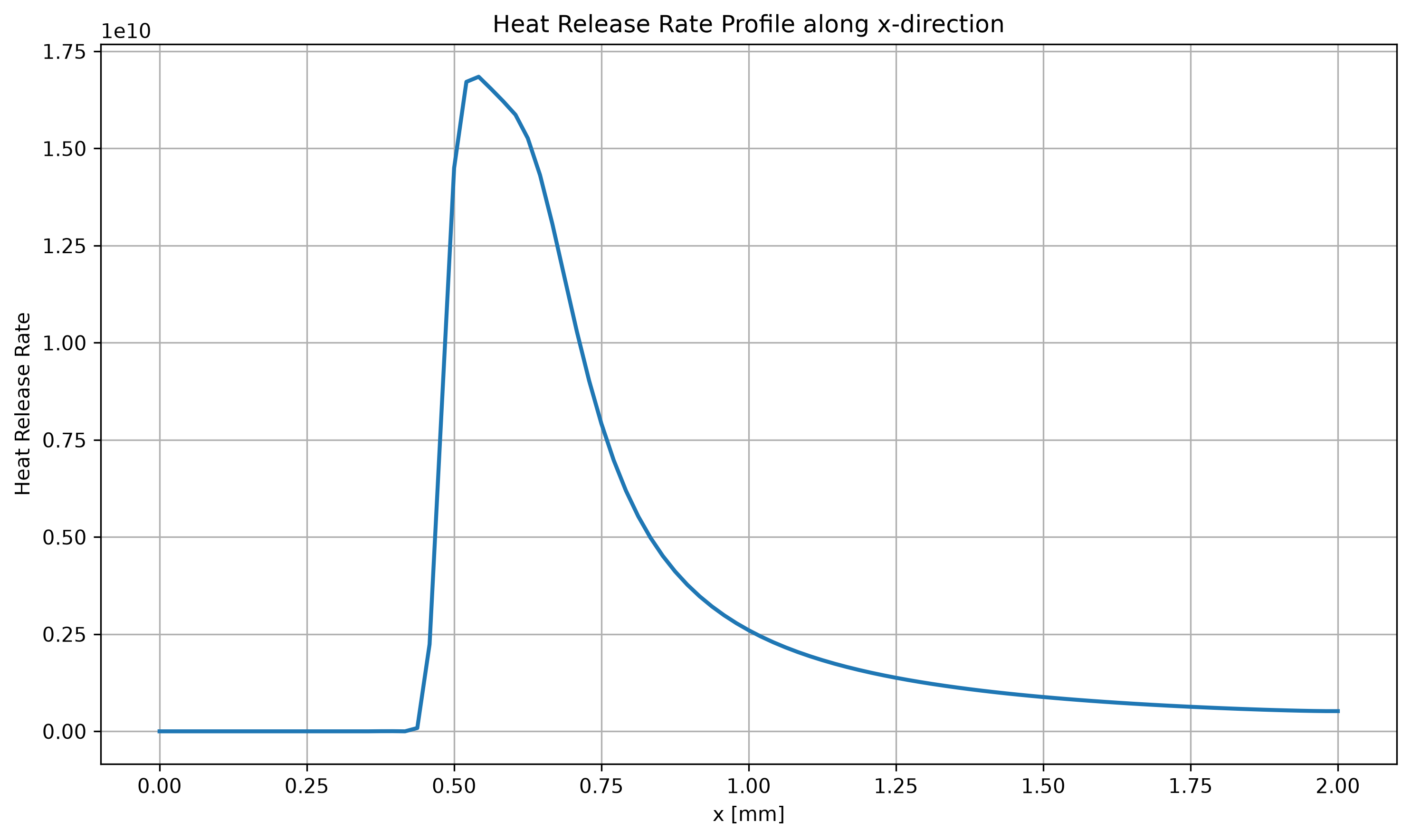
The heat release rate indicates the region where the chemical reactions release energy. The heat release rate is extracted along the same x-direction at the middle of the computational domain.
import h5py
import numpy as np
import matplotlib.pyplot as plt


# ---------------------------------------------------------
# 1. Select the DINO HDF5 result file
# ---------------------------------------------------------
file_name = "data_hdf5/dino_res_12000.h5"


# ---------------------------------------------------------
# 2. Open the HDF5 file and read heat release rate
# ---------------------------------------------------------
with h5py.File(file_name, "r") as f:

    heat_release = np.array(f["hr"])

    # Read grid information
    lower_bounds = f["CartGrid"].attrs["vsLowerBounds"]
    upper_bounds = f["CartGrid"].attrs["vsUpperBounds"]
    grid_points = f["CartGrid"].attrs["GridPoints"]


# ---------------------------------------------------------
# 3. Create the x-coordinate
# ---------------------------------------------------------
x = np.linspace(
    lower_bounds[0],
    upper_bounds[0],
    grid_points[0]
)

# Convert meters to millimeters
x_mm = x * 1000.0


# ---------------------------------------------------------
# 4. Select the middle line of the 2D domain
# ---------------------------------------------------------
# Heat release has shape (Ny, Nx).
# We select the middle y-position and plot along x.
middle_y = heat_release.shape[0] // 2

heat_release_profile = heat_release[middle_y, :]


# ---------------------------------------------------------
# 5. Plot heat release rate along the x-direction
# ---------------------------------------------------------
plt.figure(figsize=(10, 6))

plt.plot(
    x_mm,
    heat_release_profile,
    linewidth=2
)

plt.title("Heat Release Rate Profile along x-direction")
plt.xlabel("x [mm]")
plt.ylabel("Heat Release Rate")

plt.grid(True)
plt.tight_layout()


# ---------------------------------------------------------
# 6. Save the figure
# ---------------------------------------------------------
plt.savefig(
    "heat_release_spatial_profile.png",
    dpi=300,
    bbox_inches="tight"
)

plt.show()
The resulting heat release rate profile is shown below.
Two-dimensional temperature evolution
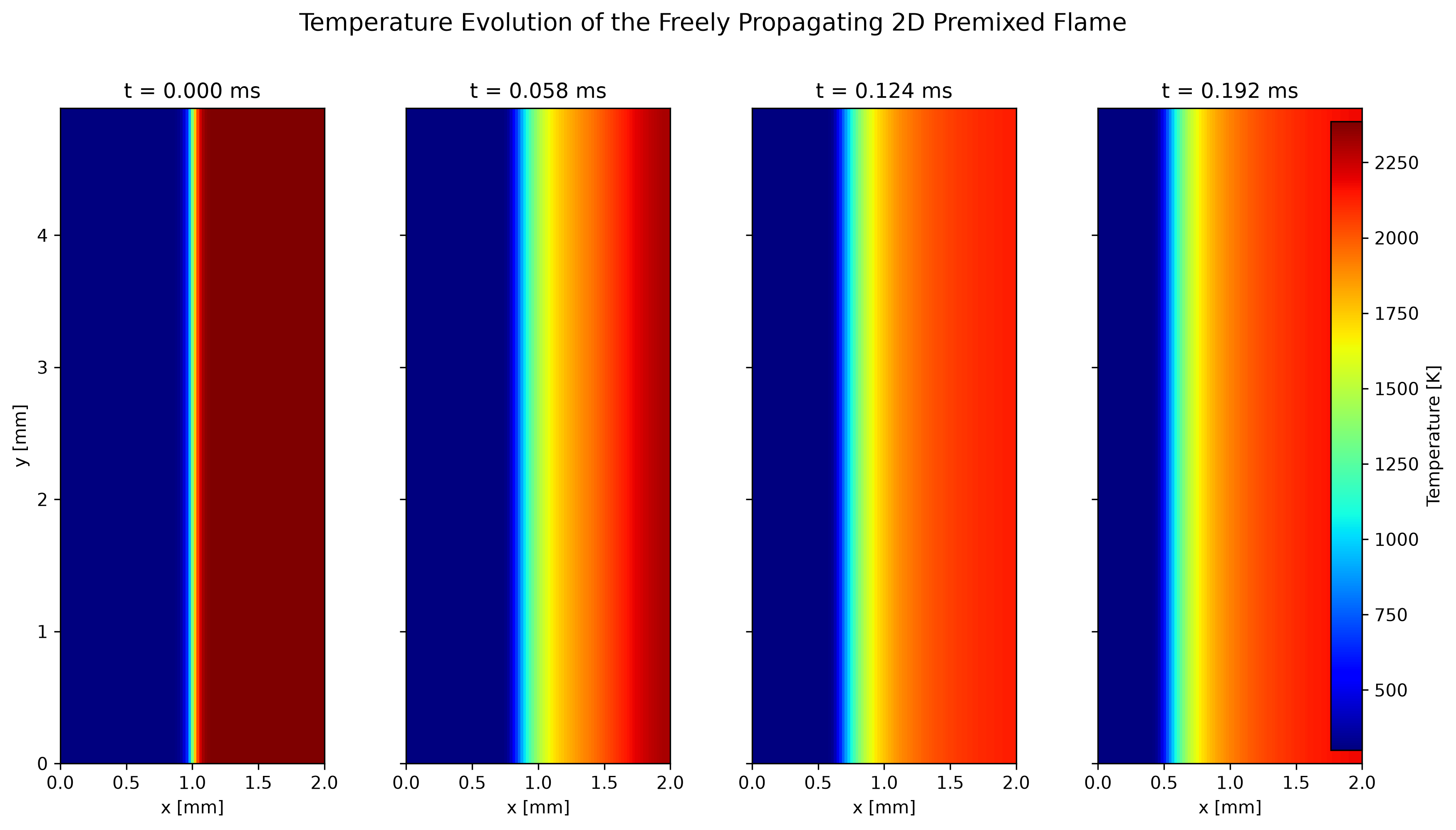
The previous plots show the flame properties along the x-direction. However, the HDF5 files also contain the complete two-dimensional solution. We can use these data to see how the flame changes during the simulation.
Temperature is a simple way to observe the development of the flame. The cold unburned mixture has a lower temperature, while the burned region has a much higher temperature. By plotting the temperature at different simulation times, we can follow the movement of the flame through the domain.
For this example, four result files are selected:
dino_res_0.h5dino_res_4000.h5dino_res_8000.h5dino_res_12000.h5
The simulation time does not need to be entered manually. It is read directly from each HDF5 file.
The following Python script reads the complete temperature field and plots the four selected time steps:
import h5py
import numpy as np
import matplotlib.pyplot as plt


# Select four DINO HDF5 result files
file_names = [
    "data_hdf5/dino_res_0.h5",
    "data_hdf5/dino_res_4000.h5",
    "data_hdf5/dino_res_8000.h5",
    "data_hdf5/dino_res_12000.h5",
]


# Read temperature fields and simulation times
temperature_fields = []
times_ms = []

for file_name in file_names:

    with h5py.File(file_name, "r") as f:

        # Complete 2D temperature field
        temperature = np.array(f["temper"])

        # Physical simulation time
        time_s = f["time"].attrs["vsTime"][0]

        # Convert time from seconds to milliseconds
        time_ms = time_s * 1000.0

        temperature_fields.append(temperature)
        times_ms.append(time_ms)


# Read the computational-domain dimensions
with h5py.File(file_names[0], "r") as f:

    lower_bounds = f["CartGrid"].attrs["vsLowerBounds"]
    upper_bounds = f["CartGrid"].attrs["vsUpperBounds"]


# Convert coordinates from meters to millimeters
x_min = lower_bounds[0] * 1000.0
x_max = upper_bounds[0] * 1000.0

y_min = lower_bounds[1] * 1000.0
y_max = upper_bounds[1] * 1000.0


# Find one common temperature range for all plots
temperature_min = min(
    temperature.min() for temperature in temperature_fields
)

temperature_max = max(
    temperature.max() for temperature in temperature_fields
)


# Create four temperature plots
fig, axes = plt.subplots(
    1,
    4,
    figsize=(13, 7),
    sharex=True,
    sharey=True
)

for ax, temperature, time_ms in zip(
    axes,
    temperature_fields,
    times_ms
):

    image = ax.imshow(
        temperature,
        origin="lower",
        extent=[x_min, x_max, y_min, y_max],
        aspect="equal",
        cmap="jet",
        vmin=temperature_min,
        vmax=temperature_max
    )

    ax.set_title(f"t = {time_ms:.3f} ms")
    ax.set_xlabel("x [mm]")


axes[0].set_ylabel("y [mm]")


# Add one common colorbar
colorbar = fig.colorbar(
    image,
    ax=axes,
    fraction=0.025,
    pad=0.03
)

colorbar.set_label("Temperature [K]")


# Add the figure title
fig.suptitle(
    "Temperature Evolution of the Freely Propagating 2D Premixed Flame",
    fontsize=14
)

fig.subplots_adjust(
    left=0.07,
    right=0.90,
    bottom=0.12,
    top=0.87,
    wspace=0.12
)


# Save the figure
plt.savefig(
    "temperature_evolution_2d.png",
    dpi=300,
    bbox_inches="tight"
)

plt.show()
The four plots use the same temperature scale, which makes it easier to compare the temperature field at different times. The change in position of the temperature transition shows how the flame moves through the computational domain.
Two-dimensional OH evolution
Temperature shows the hot and cold regions of the flame, but we can also look at a chemical species to better understand the reacting region.
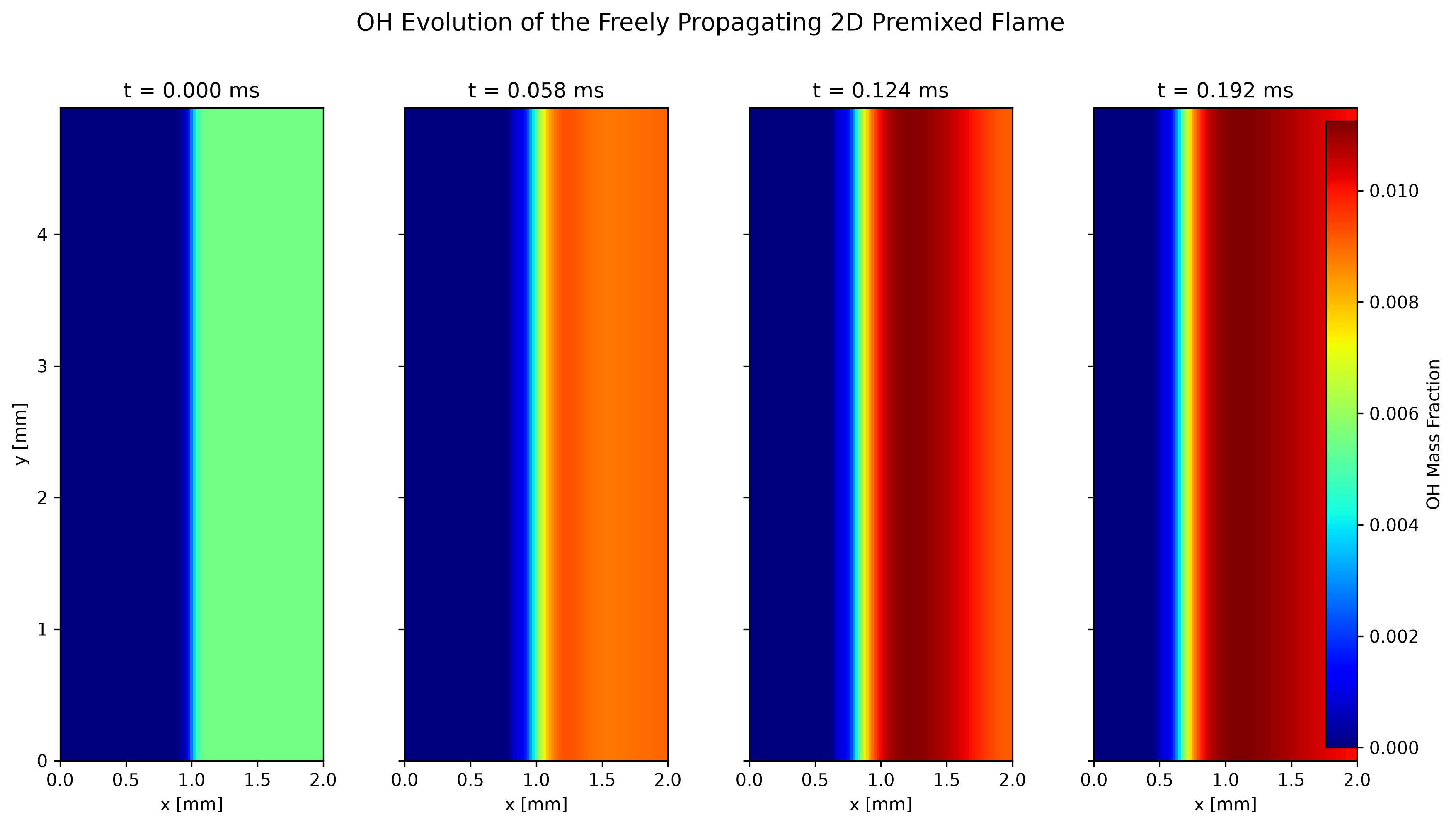
For this purpose, the OH mass fraction is plotted. OH (hydroxyl radical) is an intermediate species involved in hydrogen combustion. Its distribution is useful for observing the region where the combustion reactions are active.
The same four HDF5 files are used so that the OH results can be compared with the temperature results at the same simulation times.
The following Python script reads Y_OH from the HDF5 files and creates the two-dimensional plots:
import h5py
import numpy as np
import matplotlib.pyplot as plt


# Select four DINO HDF5 result files
file_names = [
    "data_hdf5/dino_res_0.h5",
    "data_hdf5/dino_res_4000.h5",
    "data_hdf5/dino_res_8000.h5",
    "data_hdf5/dino_res_12000.h5",
]


# Read OH fields and simulation times
OH_fields = []
times_ms = []

for file_name in file_names:

    with h5py.File(file_name, "r") as f:

        # Complete 2D OH mass-fraction field
        OH = np.array(f["Y_OH"])

        # Physical simulation time
        time_s = f["time"].attrs["vsTime"][0]

        # Convert time from seconds to milliseconds
        time_ms = time_s * 1000.0

        OH_fields.append(OH)
        times_ms.append(time_ms)


# Read the computational-domain dimensions
with h5py.File(file_names[0], "r") as f:

    lower_bounds = f["CartGrid"].attrs["vsLowerBounds"]
    upper_bounds = f["CartGrid"].attrs["vsUpperBounds"]


# Convert coordinates from meters to millimeters
x_min = lower_bounds[0] * 1000.0
x_max = upper_bounds[0] * 1000.0

y_min = lower_bounds[1] * 1000.0
y_max = upper_bounds[1] * 1000.0


# Find one common OH range for all plots
OH_min = min(
    OH.min() for OH in OH_fields
)

OH_max = max(
    OH.max() for OH in OH_fields
)


# Create four OH plots
fig, axes = plt.subplots(
    1,
    4,
    figsize=(13, 7),
    sharex=True,
    sharey=True
)

for ax, OH, time_ms in zip(
    axes,
    OH_fields,
    times_ms
):

    image = ax.imshow(
        OH,
        origin="lower",
        extent=[x_min, x_max, y_min, y_max],
        aspect="equal",
        cmap="jet",
        vmin=OH_min,
        vmax=OH_max
    )

    ax.set_title(f"t = {time_ms:.3f} ms")
    ax.set_xlabel("x [mm]")


axes[0].set_ylabel("y [mm]")


# Add one common colorbar
colorbar = fig.colorbar(
    image,
    ax=axes,
    fraction=0.025,
    pad=0.03
)

colorbar.set_label("OH Mass Fraction")


# Add the figure title
fig.suptitle(
    "OH Evolution of the Freely Propagating 2D Premixed Flame",
    fontsize=14
)

fig.subplots_adjust(
    left=0.07,
    right=0.90,
    bottom=0.12,
    top=0.87,
    wspace=0.12
)


# Save the figure
plt.savefig(
    "OH_evolution_2d.png",
    dpi=300,
    bbox_inches="tight"
)

plt.show()
The OH plots show how the OH distribution changes as the flame develops. In this case, the main variation occurs in the x-direction, while the field remains nearly uniform in the y-direction. The movement of the transition region can therefore be followed from one snapshot to the next.
Together, the temperature and OH plots give a simple view of the flame development. The temperature field shows the change between the cold and hot regions, while the OH field provides additional information about the reacting region.
Success
Congratulations! You have successfully simulated and post-processed a freely propagating two-dimensional premixed flame with DINO.